It felt like my stack should be better.
I’d seen a better way to organize already. Ones which made me calmer and feeling more in control of my days and weeks. Org-mode philosophically had a lot of what I wanted (plain text, durable, portable, auditable) in its note-taking and todo management, but the problem was the format itself and buying into emacs ecosystem (I’d go as far to say life choice). And my 2025 tools felt disconnected rom each other and heavily SaaS-driven.
But Emacs was a lonely, isolated island. Obsidian got a lot of things right, but was terrible at task management. SaaS platforms tried to lock you in and kept adding unnecessary and increasingly expensive AI features.
I wanted simplicity, data control, portability, and longevity. Not everything trying to be its own single pane of glass and lock-in attempt (particularly for AI features I had no interest in using.). So, where no product exists, I did what all insane people do, and attempting to create my own.
So, What Exactly?
Before the comments… yes, absolutely, there’s a real danger in confusing productivity with tool churn. Simple tools are best, so that’s sorta what I’m advocating. Less cumbersome, feature-factoried, waning value-props. Simple, portable tools, linked by durable formats, and vastly more amenable to getting actual things done.
Old School Tools, New Format Twists
In fact, this post is coming to you (partly) from the Frankenstein I’ve raised. A nicely packaged, opinonated, and themed neovim install. It has its issues, sure, but its a simple interface (er, if you know vim) to manipulate and leverage my notes and todo data. Usable everywhere from desktop to server and with a lightweight set of plugins and configs (vs. the whopping 1.5GB emacs install I had). It’s fast in all kinds of ways and its warts I freely own and embrace. And lua scripting in neovim is a joy compared to elisp and its ecosystem.
Let’s talk about what I needed in my tooling and how I ended up here. What did I really want?
- Note taking
Markdown won, so let’s get that out of the way org-mode folks. I needed the ability to bidirectionally link pages and headings. Also, historically durable format. About the only formats I seem to be able to still grok on my 20-ish year old filesystem are the plain text ones. It’s readable with any text editor. Easy. - Task management
Not just checkboxes. I need logging and tracking of task items, deadlines, tagging, and some sort of dashboard like what I set up with org-super-agenda. Most particularly, I need warnings (or ticklers, if you prefer). Ah yes, and preferably keyboard driven for speed rather than needing a touchpad. - Logs and journals I have a daily, weekly, monthly log set up which helps with my planning and GTDing. I needed a way to automate those via templates and I like my personal journalling, distinct from my logging, to be encrypted. Preferably via durable tools like gnupg rather than some vendor-locked or proprietary scheme.
- Latex previews Science works with formulas which means I need decent LaTeX, previewable in-the buffer, not some separate, rendered preview or browser window (less an issue if you have a wide screen and sway or other tiling window manager) but this should not be a hard thing in 2026 (it was, but now sorted. Sorta.) Note: Obsidian shined for this, btw. Nice LaTeX previews in the windows. Was great and vastly superior to the org-mode approach though org-mode has caught up now.)
- No Ops disruptions
A bunch of small, strange things which perhaps sound weird, but examples like being able to grok ledger plain text accounting. Both my personal and business finances — the only thing that has worked internationally and over time — has been the use of ledger-cli, a text-based double entry accounting system (seriously, check it out). - Input and rapid capture from anywhere
Something Obsidian’s mobile client and Superlist’s iOS app shine at. Being able to enter stuff quickly, on-the-go and create new templated entries and capture and manage todos is a big hygiene factor in the reasons I used those apps in the first place - One Inbox
I have to admit the biggest thing Superlist did for me was make a whole bunch of divergent input sources for todos that were coming at me: mail, github, slack, linear all suddenly funnel down to one inbox connected back to source. This is really its killer feature: integrations. I need this to somehow extend to my new lightsaber… somehow. - Searchable and Durable History
I’m often amazed how many SaaS-based tools or mobile clients have an utterly terrible search interface for things that have been completed. It is sometimes difficult with these tools to even find something that happened last year with any fidelity. While perhaps my needs are unique (or OCD), I regularly need to go back months to check on things that were done, or have resurfaced again, or what-was-the-thing type queries. Plain text makes this portable across years, and an extensible format works wonder here.
Rolling Your Own Lightsaber
So, let’s build this thing.
So, I started with neovim, mostly because it’s what I use for writing code (and for drafting blog posts in my Hugo repo). Also, it’s fast compared to every other tool I’ve used and runs the same on my laptop or servers.
LazyVim
I don’t want to reinvent commodity and plumbing, and I already use LazyVim and Mson to run my base neovim install and manage a minimal set of plugins. Works great and is a very stable base.
Telekasten - Bidirectional backlinks and searching
For notes, I wanted an org-roam and Obsidian replacement.
Telekasten has been shockingly great. I don’t know why it doesn’t get a lot more love in the community that it does. Where, at first, I thought it was embarking on a fool’s experiment, a few tweaks here and there and some extra plugins and lua scripting and I feel I feel like I’ve got something even better than what i get out of Obsidian and org-mode (YMMV).
So far, I’ve been quite pleased with telekasten and my tweaks. It’s simple, straightforward (and hackable), and I love the lightning-fast telescope searching/finding and previewing (via ripgrep apparently)
There are a few things I did to markdown and telekasten though to make things just a little more ergonomic from my perspective.
- Search on semantic link vs actual file name Makes things work more fluidly - if you like Obsidian you’ll prefer this
- An encrypted daily journal (which lives side by side my logs) for personal journalling and privacy. And I like gpg encryption (which I enable with the excellent little gpg helper plugin I crafted (see below).
On top of this, there were a few things I did to telekasten stock to make it work more the way I want
Better folding
One of the nicest org-mode features is the ability to use tab to fold and unfold headings/sections.
It makes looking at inforamtion easier and more focused, it allows dealing with specific areas of long documents betetr and, I peronally find (YMV) it makes my rwting more structured and pecised as well as easier to edit.
It (and perhaps keyboard driven date changes) are kinda its minor superpowers - but hardly someting you can’t replicate.
So, tab will toggle folding on a section of text which is great for zdealing with thigns. Likewise, markdown frontmatter is likewise folded autoamticaly on docuemtn open and folds via tab also when you tab on the frontmatter markers.
ALl frontmatter is folded off the get go which can be unfolded with a Tab
MdMath
Both Obsidian and org-mode were useful in my drift back into academia, since I needed LaTeX previews of math formulas and I want them in-buffer. While I don’t think I’ll ever love latex, having formulas in a nice displayed format is a godsend when you’re studying your notes (not so much when you’re writing them). Sadly, this feature was completely absent from neovim for an eternity and then when exploring just how easy it would be to simplify my stack some genius had used a technique similar to the one for emacs to directly render latex in the neovim buffer (at least in Kitty - which I promptly switched to from WezTerm.). It works great and seems a much better solution than having a separate rendering window available so I can see how I’ve messed up my
MdViews
{{ < aside > }} Disclaimer: This is a lua plugin I wrote for neovim (and my first). YMMV. {{}}
While it’s far from perfect, Dataviews for Obsidian (which I assume was based on Notion’s Databases functionality) is something I’ve come to depend on in terms of navigating and making sense of the inforamtion I am constantly pouring into my markdown files.
MdViews parses the frontmatter for specified directories and allows you to select, displaym and preview the frontmatter. For me, the primary use for this was keeping my all-important Resonance Calendar with its voluminous book notes learnings and action items from the media I consume neat and organized.
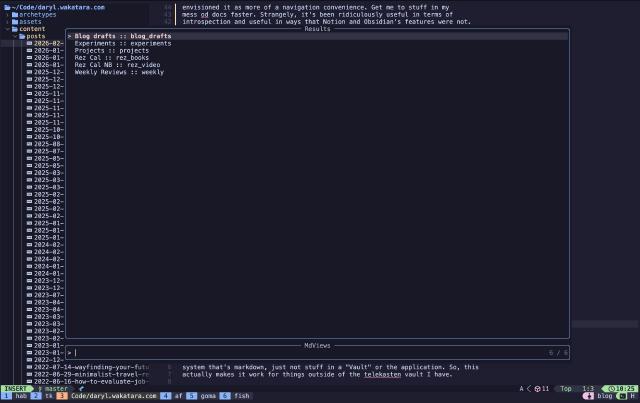
Besides that, I also use it to keep track of Projects and Experiments I am running and to move between them quickly as well as things like my Weekly and monthly reviews. I’m even using it to be a bit more methodical about stock research on my portfolio and investment selections.
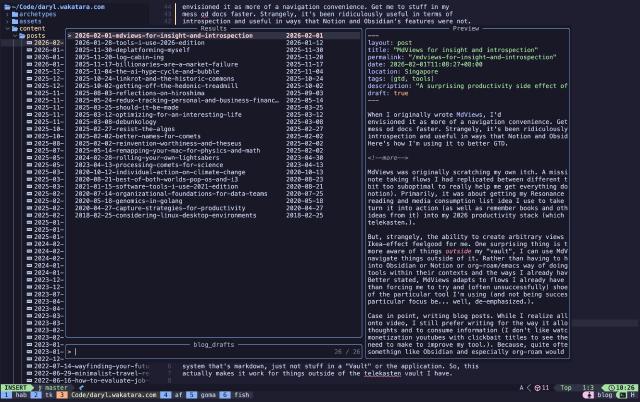
Even though I may have a slight Ikea-effect bias on this one, it’s proved inordinately useful in a stupidly short amount of time. I’ve already muscle-memoried it into my navigation of telekasten beyond its excellent logging.
Encrypted journals
While I have a daily log I keep that sort of tracks the coffee spoons of my days, for a long time in Obsidian I was conflating more sensitive personal information and in particular, my Morning Pages and journalling into the same space as Obsidian.
This always made me feel uncomfortable. It’s not that my stuff is particularly sensitive, but I am a private person and wanted something a but more secure to pour private thoughts into.
This is actually quite simple to support in telekasten with a separate
directory, a little configuration, and extracting a few lines of gpg wrapper
from some of the meatier and full-featured gpg plugins. I have a gpg.lua in my
./config/pugins directory that contains the following (it also does backups in
case something goes horribly wrong):
| |
There are heavier weight plugins available (gnupg-vim, nvim-gpg), but my needs were a simpler subset than a fully fledged nvim gpg client, so this made more sense.
I love the way it works and for some reason, I already notice how much more candid and open my journal writing seems to be. I mean, it’s a silly psychological effect, perhaps, and even a bit paranoid, but I am going to focus n the effect rather than my neuroses. =]
Task Management and Tada
{{ < aside> }} Disclaimer: Tada ia a lua plugin I am writing for neovim. Beta. {{}}
Sadly, one of the things markdown does not do well (unlike the absolutely stellar support in org-mode) is TODOs. It also does not have a native date format which signals “you need to be date aware” to parsers.
It’s clear the person who extended markdown to support checkboxes was focused more on their visual representation than real task management functionality.
Even so, it’s not too big a jump to do a mashup between the taskpaper tag format and markdown’s too basic todos and get a workable, more modern format for task management. This is, in more basic form, what the Tasks plugin does in Obsidian, tho trying to bend that to my will was a multi-experiment failure.
So,
The other key thing that something that org-mode has is absolutely stellar date management, keyboard management (which is slick) and a nice warnings feature inherent in the date format as well as decent repeats. We want all those, so we’ll be implementing that functionality on as well.
For me, what I really wanted was a mashup of org-mode’s capabilities with markdown’s simplicity and readabilty, as well as the ability of org-agenda and my org-super-agenda setup to deftly represent tasks, commitments, and upcoming work.
I saw this as a question of format. Org-mode uses a multi-line and folding drawer approach to handle managing flagging changing deadlines and scheduling, and also logging information over time. It’s fast and scarily efficient though your data, especially over time is a mess as all the information is jumbled under the todo - which is a HEADING and well, it’s just an approach that grates after a while and is impossible to parse without org-mode and Emacs - which flies in the face of readability and portability.
The other thing that org-mode does well is having a well specified date format
of which the parser is aware. It also extends that format slightly to deal with
things like repeating events, and… for me probably it’s most important
feature, warnings. Warnings are forward alerts, which in the GTD world of David
Allen are called Ticklers and are the reminders that I find so critical. Oh, I
have a deadline coming up in 2 weeks? I just set a warning of -2w on the end
of the due date.
So, yeah, we’re gonna steal the org-mode date format and riff on it, while ditching the idea of drawers under the TODO heading.
Since I wanted to cleanly delineate telekasten tagging from tada tags, and I
needed to reserve keywords of some description I stole an idea from the
excellent Taskpaper format (and application – a very good alternative to all
this approach if you prefer Todo lists over embedded Todos in your text notes)
and have a few reserved tags that are used by the application @due(yyyy-mm-dd)
for deadlines, @do(yyyy-mm-dd) for scheduled items, @done(yyyy-mm-dd) for
when something was completed, and @kill(yyyy-mm-dd) for those things we’ve
cancelled.
Add a few adjustments for times and timezones and you can build an agenda and scheduler out of this. Repeats follow the same implementation as org-mode as do the warnings. Timezones are considered local to whatever timezones you’re in unless you specify them with a TZ+8 etc… ).
OK, so how do we avoid the clutter under the task when we need to add notes on a task or otherwise log something about a task like moving it or similar.
Well, markdown has the potential to use footnoting.
What is that? Yeah, I bet you’ve never used it. I certainly hadn’t though I was
aware of it. For each line if I want to log something about the task (like
moving the deadline etc which I do automatically if done via picklist), we
attach a ^hashhere to the task and then write notes and status changes in a
separate directory that the plugin is aware of (note: originally I had written
these into a section at the bottom of the page, but for lots of todos that
quickly became unmanageable). Now, the footnote in the todo links to a
wikilinked (since telekasten) that follows to a hashed+slugged markdown file
in a directory tada_tasklogs. The plugin is then aware of this if you want to
see your logged items (L) or create a log item (l).
The Tada plugin parses my files (and is shockingly efficient with ripgrep) and then returns a date-aware dashboard for me of tasks, birthdays, anniversaries for things that are scheduled or on deadline, overdue, and upcoming tasks. I’ve also used it to resurrect my little mini-CRM system so I remember to contact people on a regular basis when I get too busy.
It has been - well, super handy though still working on the visuals. Add in tab folding for each section and you’ve got yourself a pretty serviceable org-mode replacement (at least the parts I use) in markdown and in neovim. Syncthing your directories to a server and you can use this via a terminal from anywhere (though have not done that in anger or day to day practice yet, using everything locally.). But it’s coming.
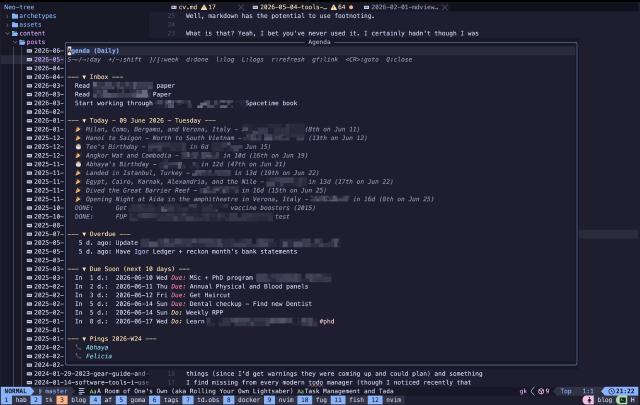
So, how does it work? The @ symbol is reserved specifically for Tado tags and
I reserv e hashtags for Telekasten’s built-in system.
Repeats are handled dynamically by the system. @due(2026-01-08 +1w) when marked done, logs the fact it was done and then updates the date on the @due dynamically, so that it is ready for the next occurrence.
Warning are handled from the date backwards. The idea there is the ubiquitous Tickler system of David Allen Getting Things Done fame where you get a warning in your agenda before something may be due to that you have time to work on it.
For me, this is ‘GOLD’ and was used across my old system for everything from planning for birthdays to trips and really made me feel like I was on top of things (since I’d get warnings they were coming up and could plan) and something I find missing from every modern todo manager (though I noticed recently that Apple’s Reminders app has a klunky way to do this).
I’ve bound all all of Tada to <leader t> so that everything is a little easier
though have to admit to having some conflicts on keypresses (or naming that need
to be resolved.). I also find the mnemonics for the keys to be easier to
remember than the ones for Emacs org-mode. YMMV.
<leader>t* maps for Tada and is available from any markdown file you have
open.
| Key | Action | Underlying command |
|---|---|---|
<leader>ta | Open agenda | :TadaAgenda |
<leader>tA | Agenda filtered by tags | :TadaAgendaWithTags |
<leader>tw | Week view (7 days) | :TadaAgendaWeek |
<leader>tM | Month view (30 days) | :TadaAgendaMonth |
<leader>tD | Dashboard (custom groups) | :TadaDashboard |
<leader>ti | Quick capture to inbox | :TadaCapture |
<leader>tn | New task | :TadaNewTask |
<leader>td | Mark done (toggle) | :TadaMarkDone |
<leader>tk | Kill / cancel (toggle) | :TadaMarkKill |
<leader>tr | Reopen done/killed task | :TadaReopen |
<leader>tt | Toggle task state | :TadaToggle |
<leader>tl | Add a log entry to task | :TadaAddLog |
<leader>tL | View logs modal for task | :TadaViewLogs |
<leader>ts | Schedule @do via calendar | :TadaSchedule |
<leader>te | Deadline @due via calendar | :TadaDeadline |
<leader>to | List all open tasks | :TadaListOpen |
<leader>tO | List overdue tasks | :TadaListOverdue |
<leader>tT | Search by tag | :TadaSearchTag |
<leader>t/ | Search by text | :TadaSearchText |
<leader>tC | Toggle reserved-tag concealment | :TadaToggleConceal |
Date shifting on the cursor’s date (markdown buffers, org-style)
Set by the plugin automatically on every markdown buffer. Operates on the date
under the cursor (e.g., inside @do(...) or @due(...)). Falls back to
native motion if no date is found on the line (I want to improve this slightly
so that it works in the agenda view for moving dates and on any line with a
date, but have not had time to circle back to improve it yet)
| Key | Action | Fallback (no date on line) |
|---|---|---|
<S-Right> | +1 day | w (word forward) |
<S-Left> | −1 day | b (word back) |
<S-Down> | +7 days (1 week later) | j (line down) |
<S-Up> | −7 days (1 week earlier) | k (line up) |
2. Agenda view buffer
Opens via <leader>ta / <leader>tw / <leader>tM / <leader>tA.
Navigation & view
| Key | Action |
|---|---|
r | Refresh (re-parse agenda files) |
<S-Right> | Next page |
<S-Left> | Previous page |
<Tab> | Toggle fold of section under cursor |
<CR> | Jump to task in its source file |
<leader>zl / gf | Follow [[wikilink]] under cursor |
Q / <Esc> | Close agenda |
Task actions
| Key | Action |
|---|---|
d / <leader>td | Mark task under cursor done |
<leader>tk | Kill task under cursor |
<leader>tt | Set ping week (peeps only — prompts for YYYY-Www) |
l / <leader>tl | Add a log entry to task |
L / <leader>tL | Open logs modal for task - ie view task notes |
Date shifting (on the task under cursor)
Works on tasks, calendar events, and ping items (pings are converted to week-based shifts under the hood).
| Key | Action |
|---|---|
+ | +1 day |
- | −1 day |
] | +7 days (1 week later) |
[ | −7 days (1 week earlier) |
So far, this has been working scarily well even in its basic, rough form, and much better than I thought it would (though obviously it needs some evolution). Lua has been a joy to work in compared to emacs-lisp and I’m genuinely enjoying the speed.
The Mobile Conundrum
One of the shortfalls of this system is what to do when I’m not on the laptop. While neovim works extremely well (and outside of the teleksten directories), I often want to input notes or otherwise spawn stuff when I’m on the go.
So far, and perhaps strangely, Obsidian has been the best mid-way solution to this. I simply point the Obsidian mobile client at the iCloud directory or syncthing-ed directory of files and I have a nice mobile client that uses wikilinks and has my stuff on the go.
Of course, I don’t get nice stuff like my agenda and tasks management approaches, but maybe as I get more comfy with the lua plugin I’ve created I’ll take a shot at creating a plugin in Obsidian (which, btw, also works for looking at stuff on the desktop as well under this scheme.). It also, obviously does not provide access to your encrypted journals since you’d need gnupg and keys access, and is one of my biggest issues, since trying to make sure I do journal while I am in motion and not at the laptop every day.
And don’t want to necessarily invent a separate mobile app for Tada and MdViews when 80% of what I need is in Obsidian already. (though this implies I also need to make a plugin for Obsidian, which I am loathe to do - and implies I need to get much better at Typescript and learn Electron’s idiosyncrasies).
Fin
And that’s what the toolchain looks like sliding into 2026. There’s probably a post that needs to be written on dev-, astro-, physics-, and math- tools, but for the daily and weekly drivers, this would be the list (for example, really trying to find a tool that allows me to “handwrite” advanced mathematical formula on something like an iPad and have that convert automatically to LaTeX code for use in longer term notes while in lectures or watching videos. So far, I’ve failed at written iPad notetaking terribly.).
As a general trend, I seem to be constantly having tension between self-hosted files and control and the services I need to link them across devices. As well as my lack of ability to find a task management system that is effective as org-mode but more interoperable and collaborative with the world than emacs. I do see companies making alternatives, but few seem to be compelling enough to run as “fire and forget” services, cost-effectively on a VPS or , or to promote interoperability. So, would love to hear people’s experiences with what they may have tried.
If you’re interested in seeing how things have changed over time, you can see
previous years’ posts for
2025,
2024,
2023,
2022.
2021,
2020,
2019,
2018, to
2017.
I hope you found something interesting either in my log cabin-ing my own toolset, or even in taking a look at org-mode (it is very good if you can handle its warts). If you read the above and thinking there is something I should know about or try, please feel free to drop me a line. Always curious about what works for people and makes them productive (heck, maybe I just need to simplify.
If this post was useful to you, lemme know via mail or elephant below. Feel free to mention or ping me on @awws on mastodon or email me at hola@wakatara.com.