MdViews: Dataviews for Neovim
I muscled through 2025 stack unchanged , but felt increasingly dissatisfied with my GTD setup. While it was easy (and pretty) to dump stuff into my stack, it was harder to get results out of it or do tactical and strategic planning vs executional task management.
I felt my stack was taking energy and effort rather than facilitating getting things done. It wasn’t so much my process, but felt like my tools were causing friction: disconnected, overweight, overpriced… I wanted something composable, open source, plain-text, cross-platform, svelte, and fluid.
Longer post coming on the full 2026 stack changes, but one of the first things I needed to close the gap on my current GTD workflow was an easy way of navigating and organizing semantically related groups of plain-text markdown files.
So, first off, I wrote MdViews (Markdown Views). MdViews parses frontmatter fields across markdown files (in my case, templates for various types of information which has set frontmatter), and displays a previewable picklist allowing dynamic views of your data. People who have used Obsidian’s Dataviews or Notion Databases should feel right at home. It’s just simpler, more lightweight, and faster (and I personally prefer the way it allows you to have an overview of your information. YMMV.). You configure views you can then select after triggering MdViews via hotkey and navigate or manage your information better.
I personally use it in conjunction with the excellent
Telekasten
(which I find a
great Obsidian, Notion, and org-mode replacement). MdViews gets used to navigate
overviews of directories of information and manage getting things done with sets
of notes all linked to <leader> zv (to think of it as part of telekasten. This
triggers available views and allows me to pick what I’m trying to wrangle, from
my Resonance Calendar (booklist and media consumption notes), Projects I’m
working on, my Experiments, and even tracking stock research for my monthly
portfolio picks.
For example, here’s the start of this year’s Resonance Calendar, including books reads, ratings, and a preview of the actual book notes.
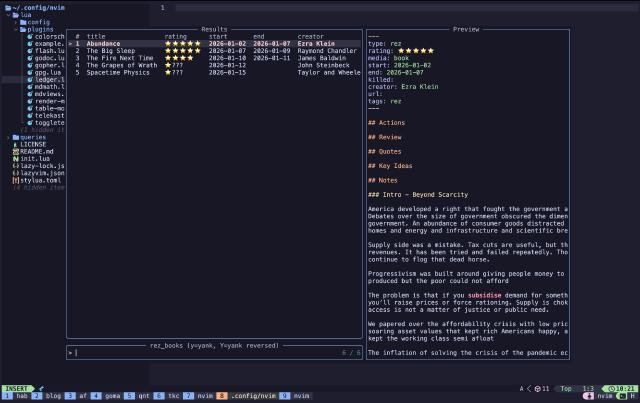
I actually like it way better than my old setups (in Notion and Obsidian respectively - though they were arguably “prettier”) since it gives me direct access to the notes in the preview which is handier for noticing missing stuff or adding in info (though I do need to figure out how to get telescope to preview the markdown.).
I also included a handy yank command for grabbing the view data as a markdown table for further repurposing of the information in other places.
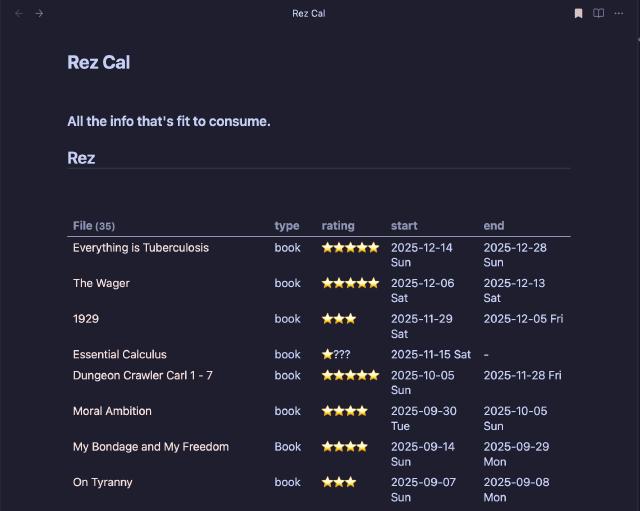
You simply configure a view via “query” in the plugins/mdviews.lua using
various operators, and whenever you use <leader> zv, you get a popup of
available views which you can then select from to something similar to the
Resonance Calendar above.
| |
And that’s it. Use it for whatever you may want to keep track of or see overarching summaries for.
Fin
I hope you find this a simple, minimalistic approach to better understanding your notes and interconnections. It’s meant to be a bit like one of my other open source programs, harsh in terms of being easy and unobtrusive, and quick to use to get at what you want.
MdViews is still in early stages, and at this point, more a tool encoding my GTD and notetaking flows in as lightweight a way as possible, so looking forward to feedback. So far, it’s working better than I hoped and looking forward to seeing if I can roll a few other minimal plugins to get me a faster, lightweight stack. If you have feature ideas that won’t bloat, please don’t hesitate to post an issue in the GH.
If MdViews is useful to you and you are using it, or you have some constructive feedback (it’s my first nvim and Lua plugin, after all ), please let me know via mail or elephant below. Feel free to mention or ping me on @awws on mastodon or email me at hola@wakatara.com .