Be Your Own Netflix Redux
I’ve been all sorts of happy (so have my friends) with the setup I outlined in Be Your Own Netflix (I advise reading it first. Go on. I’ll wait here till you’re done).
It’s been kinda cool: a tight-knit book club kinda thing, just for movies and shows. Curated. Opinionated. High quality.
But I did notice a few things with the setup that could be improved for folk.
- Not everyone has a fast home line (or super reliable internet provider)
- Not everyone has a homelab (or spare machine to be a server)
- Security wise, while it is fine with a homelab setup, leaving port 8096 open is unnecessary, which simplifies setup and makes security tighter
The original article is fine (don’t worry if you used that for your setup), but when my old, spare laptop I had serving this went belly-up one morning in March due to a bad OSX upgrade requiring a complete restore of the 1TB drive, so I reexamined what I’d done (friends were surprisingly bummed that DFlix was down for 2 days.).
The Better Setup
The homelab server chez moi was an old M1 Macbook Air laptop I’d replaced (which is overkill for this function but I host other things there). The machine dying, as well as its pokey (but still acceptable) performance on streaming while I was on a trip in South Africa made me think maybe moving this to a proper server was a good idea (despite the cost - still cheaper than a new machine if you are thinking of that for just this purpose.).
So this version will let you set up on any server that has block storage (note: you can, with hacks, use Jellyfin with S3, but egress and GET requests will cost you probably much more than this simpler setup). So, find a serious, price-effective hoster with a nice whack of SSD space (or HDD and SSD cache) for a reasonable price (I like Hertzner) and this’ll work fine. Make sur eit has some decent bandwidth (enough for you and your friends, anyway) so you don’t get dinged or rate-capped that way. You rprimary goal here is a good, reliable VPS hoster with generous (or at least decent) storag and bandwidth. I’m hosting in the EU (avoiding anything US these days). YMMV.
This setup forces everything to use SSL via LetsEncrypt so all is https, even
for your homelab (who trusts their TV nowadays anyway?). All the good clients I
checked for AppleTV (and most Smart TVs) suported https, so you should be good.
I use an ancient, gifted, AppleTV puck at home and it works great. I highly
recommend the (paid) Infuse client. It supports https and once you set up DNS to
point at your server’s IP of flix.domain.com and get LetsEncrypt working with
the previous Traefik setup, you’re good to go and the setup works homelab or on
a remote server with tighter security. I still host on my homelab (though
checked the setup on a VPS as well) and I just port forward my router/firewall
to port 443 on the homelab machine. Works great.
I just connect the client to the https address of flix.domain.com and
everything works great. If your router is smart, it should re-route internally
even if you have this hosted at home rather than routing the possibly long way
around.
The extra complexity here is, that if you do host on a provider’s VPS you need
to configure a proper firewall (I recommend ufw since it’s easier to use, but
since firewall configuration can be tricky, and really beyond the scope of this
article, I leave it up to you to lock down your instance.). Basically though,
lock down port 22 for ssh (and perhaps change the port) for remote logins and
port 443 for https. but you can solve that with general hardening procedures
for any server, locking down a bare host to port 22 for ssh remote logins and
port 443 for https.
Other than that, have docker on the machine and then use the following
docker-compose.yml for bringing up both traefik which handles the reverse
proxy, and jellyfin itself.
At time of writing, Jellyfin just upgraded to 10.11.8.
| |
The more complicated compose part of the file puts a reverse proxy in front of
your Jellyfin, and then will set up SSL viaLet's Encrypt and provide a
terminator for your subdomain. Note: your email address must be valid at that
domain to set up the subdomain securely.
After setting that up, I’d also personally close port 80, even though this setup
also redirects all http traffic to https once set up.
My directories in /media like this:
| |
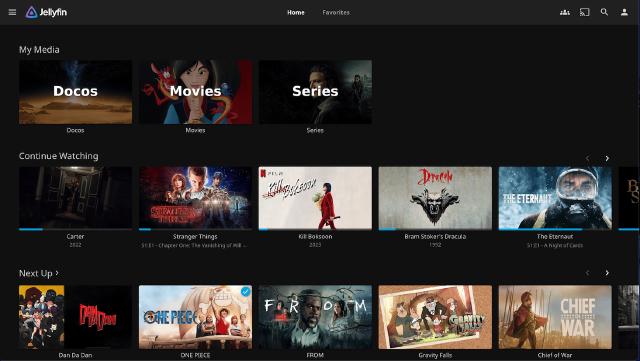
Docos for documentaries (I watch a lot), Movies, and of course, episodic
Shows.
Use docker compose up and then point your browser at
https://flix.domain.com to get everything configured and especially to
set up your core admin user (I also recommend setting the max login attempts
before lockout for the user if you are going to expose this to the internet -
something like 5 or so to avoid automated script-kiddie brute force attempts
against the login.
Your Local TV experience
Couldn’t be simpler. use your Infuse client (or client of choice) to point at
https://flix.domain.com and log in with your username and password (generally
the most annoying part on the AppleTV interface) and you are good to go and
start streaming shows to your local TV. Congrats!
And believe it or not, that’s about it. If you’ve done this properly, as soon as
your DNS change propagates you can point to https://myflix.yourdomain.com with
any internet connected device with a browser and you’ve got a secure, ssl
connection to your media library.
Fin
And that’s about as easy as I think you can make it while making it even more
secure. Software-wise this has been running a while now (barring OSX updates
going off the rails) and other than occassionally upgrading by bringing the
machine down and back up again (if it does not replace the image docker rmi jellyfin:jellyfin-latest then spin up again) to update jellyfin or traefik when
I see there are new releases, it’s been absolutely great and trouble free.
I hope you found this useful. If this post was and you end up adopting the yourflix approach, drop me a line and let me know, via mail or elephant below. If you have a better approach, tighter security, or think you have additions that might make this better, please holler. Feel free to mention or ping me on @awws on mastodon or email me at hola@wakatara.com .